5 aplicativos para Android que tornam a sua rotina mais produtiva


Não importa se você é um assistente, estudante, analista ou empreendedor, todos nós sabemos como é difícil organizar todas as nossas tarefas e compromissos diários. Muitos aplicativos prometem unificar informações, apresentações e relatórios de maneira fácil e usual, mas, quais desses apps voltados para produtividade realmente cumprem com o prometido? Confira nossa seleção com 5 ótimos apps que podem tornar a sua rotina mais produtiva.
1 - Trello
É impossível começar uma seleção com apps para produtividade sem mencionar essa poderosa ferramenta que é o Trello. Para quem não está familiarizado com o app, o Trello é uma ferramenta para gerenciamento de projetos individuais ou colaborativos. A interface principal do Trello, basicamente, se divide em três etapas: o que fazer, fazendo e pronto. Cada uma dessas etapas podem ser encontradas dentro das tarefas criadas pelo usuário, sejam elas coletivas ou particular.
O usuário precisa criar uma tarefa, acessá-la e inclui anexos, anotações, comentários e etiquetas em cada uma das etapas criadas, começando pela primeira (o que fazer). É possível definir um lembrete para que o Trello avise automaticamente sobre suas pendências em etapas específicas como, por exemplo, cobrar uma equipe ou fazer uma ligação para determinado contato. As etapas finalizadas podem ser movidas para a coluna "pronto" (done), ou então para a coluna "fazendo", caso você esteja trabalhando naquela tarefa no momento.
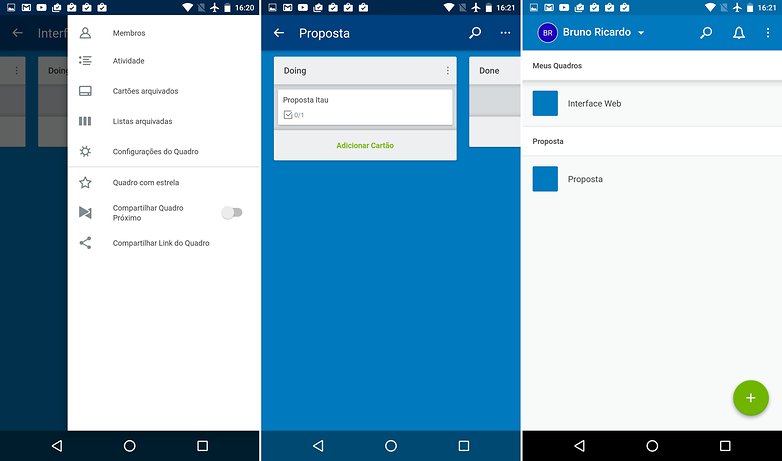
Teoricamente, o Trello parece ser uma ferramenta complicada, mas, na prática, com alguns minutos de uso qualquer usuário consegue dominá-lo. Este app é indicado para usuários que trabalham por conta própria, com equipes ou remotamente, independente da quantidade dos projetos. O objetivo do Trello é manter seus principais trabalhos sob controle.
${app-com.trello}2 - Slack
O e-mail pode ser uma ferramenta essencial para a comunicação interna de uma empresa ou para um grupo de estudos, por exemplo. Mas, convenhamos, ele não é nada prático. A proposta do Slack não é substituir as ferramentas de comunicação existentes, como o Skype ou um cliente de e-mail, mas centralizá-las em uma única plataforma. Para isso, após fazer o download do Slack, é preciso criar um domínio personalizado e convidar seus contatos para participarem de chats específicos criados por você.
As opções existentes numa conversação são excelentes, na verdade, elas são uma mistura de recursos do Telegram com extensões de outros apps, como o próprio Trello. É possível favoritar uma conversa, mencionar um contato específico no grupo para que ele seja notificado separadamente e até mesmo enviar GIFs animados. Os plugins são os pontos fortes do Slack, visto que é possível integrar serviços e ferramentas com o comunicador, como o Dropbox, o Google Drive, o Trello e até o SoundCloud.
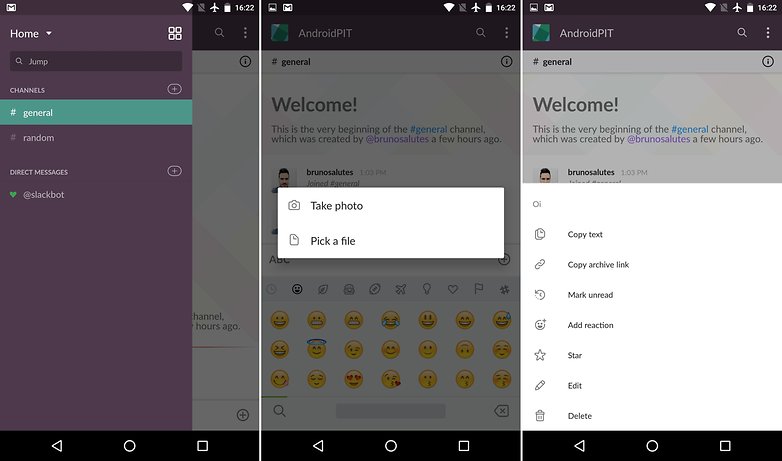
Os comandos facilitam a vida de qualquer usuário na hora de se comunicar, por exemplo, é possível iniciar uma chamada de vídeo pelo Hangouts dentro do Slack. As versões para web, Windows, Mac e smartphones tornam a integração ainda melhor.
${app-com.Slack}3 - Microsoft Outlook
Atualmente, o cliente de e-mail da Microsoft é a melhor alternativa para quem procura por uma opção prática, eficiente e organizada. O Outlook deixou de ser um cliente de e-mail com funções limitadas e passou a oferecer uma gama de recursos bem interessantes. Além de suportar as contas da Microsoft (Live, Hotmail e Outlook.com), o Outlook oferece suporte pra contas do Yahoo, Gmail - e Gmail for business - iCloud, Microsoft Exchange, Office 365 e IMAP. É possível criar filtros, pastas, caixas de entrada inteligentes e assinatura personalizada para cada conta adicionada.
O diferencial do Outlook é sua integração com o Sunrise Calendar, app de calendário adquirido pela Microsoft, que adiciona automaticamente os eventos registrados nas contas adicionadas e as coloca como uma guia do app. Assim, você tem um cliente de e-mail, calendário, contatos e arquivos hospedados no OneDrive integrados em um único app.
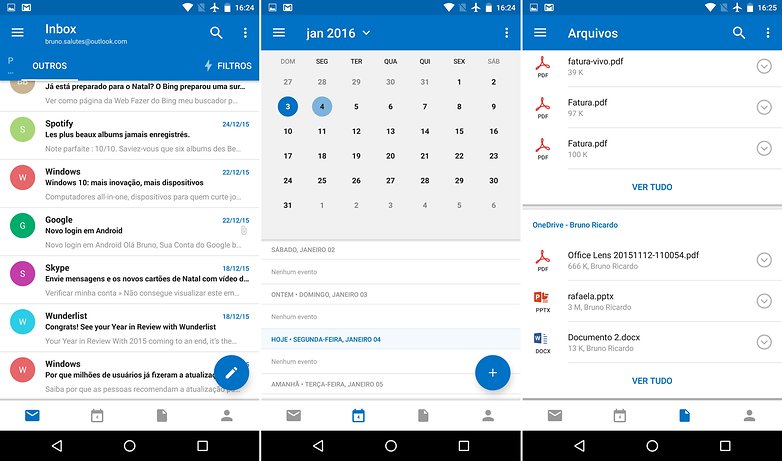
Se você utiliza o OneDrive e quer aproveitar ao máximo a integração oferecida pelos serviços da Microsoft, não deixe baixar os apps do Office. Excel, One Note, PowerPoint e Word estão disponíveis para Android e intensificam ainda mais essa experiência de integração entre dispositivos móveis com suas tradicionais versões para PC, Mac e até mesmo web. Tudo o que precisará é de uma conta Microsoft, com um Hotmail, por exemplo.
${app-com.microsoft.office.outlook}4 - Todoist
Um bom gerenciador de listas de tarefas não precisa de muita coisa, basta uma interface organizada, limpa e com comandos intuitivos. Além disso, opções como agendamentos pré-programados e integração com calendários são indispensáveis. Levando em consideração todas essas exigências, podemos dizer que o Todoist é uma ótima indicação de app, cumpre com esses itens e ainda traz alguns extras.
O ponto forte do Todoist é sua interface, minimalista e pensada para ser prática, visto que todos os comandos disponíveis no app estão reunidos no menu flutuante no canto inferior direito. É possível programar uma tarefa e sincronizá-la com sua Conta do Google, além de definir lembretes para estas com períodos e horários personalizados.
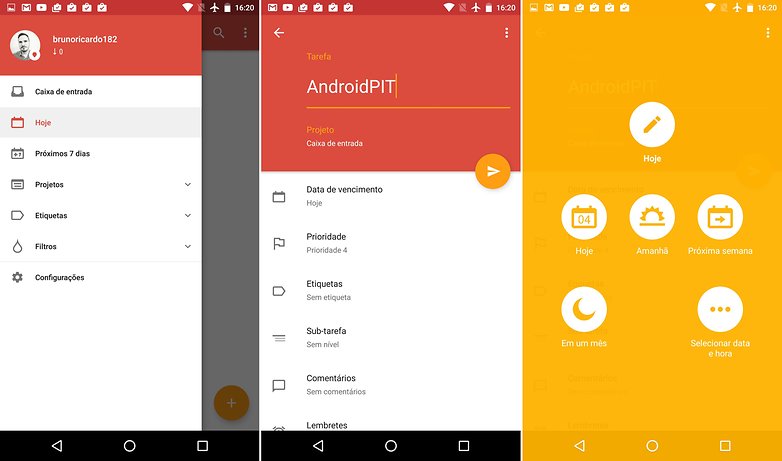
A organização também é outro ponto interessante do Todoist, principalmente seu sistema de etiquetas para tarefas, filtros de tarefas em andamento ou já finalizadas. Suas tarefas estão acessíveis a partir da web e do app oficial para Mac, além de versões para smartphones ou tablets que possuam o Todoist instalado e logado na mesma conta. Agilidade e produtividade são os diferenciais do Todoist.
${app-com.todoist}5 - Evernote
O Evernote é o tipo de aplicativo que ainda não foi superado pelos seus concorrentes, como o One Note, Google Keep e similares. O foco na produtividade e no acesso às informações do usuário a partir de qualquer plataforma - mesmo quando offline - são características únicas do Evernote. Quem nunca precisou rascunhar alguma informação e achou a ideia de usar o smartphone para essa finalidade um tanto estranha? Pois bem, o objetivo do Evernote vai um pouco além de criar anotações, visto que essa plataforma é uma das mais completas em termos de organização e produtividade.
Você pode inserir uma nota, criar um caderno ou uma agenda de compromissos mesmo sem qualquer conexão com a internet. O aplicativo mantém tudo sincronizado quando a conexão é ativada novamente, até mesmo em múltiplos dispositivos que estejam logados com a mesma conta. Além de gerenciar o conteúdo offline, o Evernote é um excelente companheiro para viagens onde a conexão com redes móveis e pontos de Wi-Fi fica sempre comprometida.
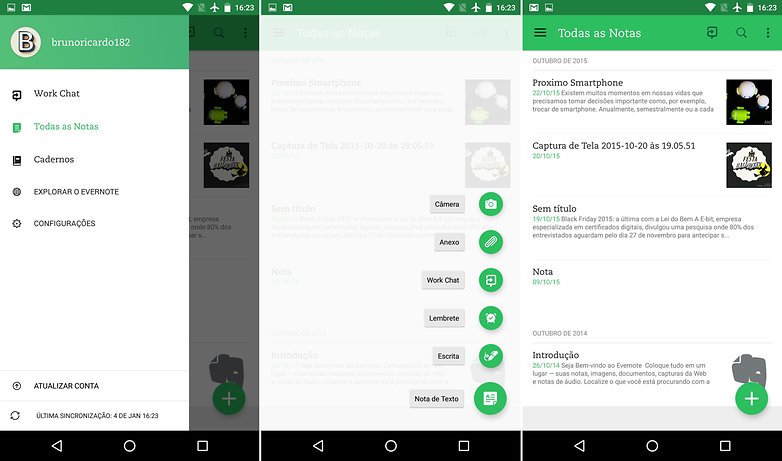
Os cadernos criados podem ser etiquetados, personalizados com anexos, mapas, informações à mão e ordenados em categorias diferentes, como estudos, trabalhos, receitas e projetos, por exemplo. A interface do Evernote é extremamente funcional, permitindo que todos os usuários se familiarizem rapidamente com suas funcionalidades.
Artigos relacionados
E aí, quais aplicativos você utiliza para se organizar? Você irá experimentar algum aplicativo da nossa seleção a partir de hoje?






Trello, Any.DO, Sunrise Calendar
keep, interage com com outros app da google e posso compartilhar dentro dos contatos google. Perfeito!
Clip Stack, Google Keep, Native Clipboard
Bem interessante o Keep, testando ele.
Keep que não está adicionado na matéria acima é um dos melhores e ainda é conectado com meu gmail, bem prático.
Também prefiro o keep da google, e seus após, pois a integração e simplicidade são bem intuitiva.
Desculpe, mas já tive a oportunidade de utilizar o Evernote, e infelizmente tenho que discordar, o Google Keep me atende muito melhor que este programa (Evernote), que não é integrado com o Google.
gosto muito desse evernote
Pessoal vocês notaram como todos esses aplicativos são semelhantes entre si, ou seja desempenham funções parecidas, ai quando você vê, páááá esta lotado de aplicativos sem a menor necessidade, quanta ilusão.
É para você analisar e escolher o que achar mais agradável, por isso são parecidos.
Prefiro os Apps da Google: Agenda/Keep/Gmail, ótima sincronização e nativos da Big G. Um dos poucos aplicativos que uso (para produtividade), não Google, é o Office da Microsoft.
Iria de Wunderlist ao Todoist.
Ótimos aplicativos!
Evernote é a única coisa útil nessa lista.. nada que grupos no whatsapp e o Focus Notifications não resolva meu problema de produtividade.
Prefiro o Keep ao Evernote. É mais do que suficiente pra min, além de ser muito prático e simples.
outlook ? sera bom antes de eu conhecer o google Inbox
como assim não tem o Pushbullet? Outlook? prefiro o meu tradicional GMAIL.
O pushbullet não é bom como antes, a assinatura é cara e a versão gratuita é muito limitada. Já usei o Outlook mail, ele é mais organizado e intuitivo, mas acabei ficado com o Gmail mesmo.
O Pushbullet atualmente deve ser o maior zero à esquerda do Android.
Tornar o app pago por uma assinatura monstruosa, e deixar a versão gratuita totalmente capada, acabou com o app.
Eu uso o método do Franklin Covey junto com o TickTick. Ótimo!