Como fazer root no Android: o guia completo

O tema root é sempre comentado em sites especializados sobre o sistema operacional Android. Mas muitos ainda não sabem o que isso significa ou querem saber ainda mais sobre o assunto. Por isso, te apresento aqui um artigo completíssimo com tudo o que você sempre quis saber sobre root no sistema operacional móvel do Google. Este artigo passou por uma grande reformulação, então você irá encontrar informações e links atualizados.
O que é Root?
A palavra root significa “raiz” em inglês e vem do mundo Linux, sistema operacional no qual o Android é baseado. No Linux (e derivados) root é o superusuário, o único que tem permissões irrestritas para acesso a todo o sistema. No Android é a mesma coisa: ao se tornar root você ganha acesso integral ao sistema e pode modificá-lo livremente.
Porém, um usuário inexperiente tentando "fazer root" pode causar sérios danos ao dispositivo, pois se algo der errado arquivos importantes do sistema podem ser danificados, comprometendo o aparelho. Controlar o acesso dos usuários e apps ao sistema é um dos motivos pelos quais os telefones não vêm "rooteados" de fábrica e por que você deve tomar muito, mas muito cuidado mesmo, ao "rootear" seu smartphone.
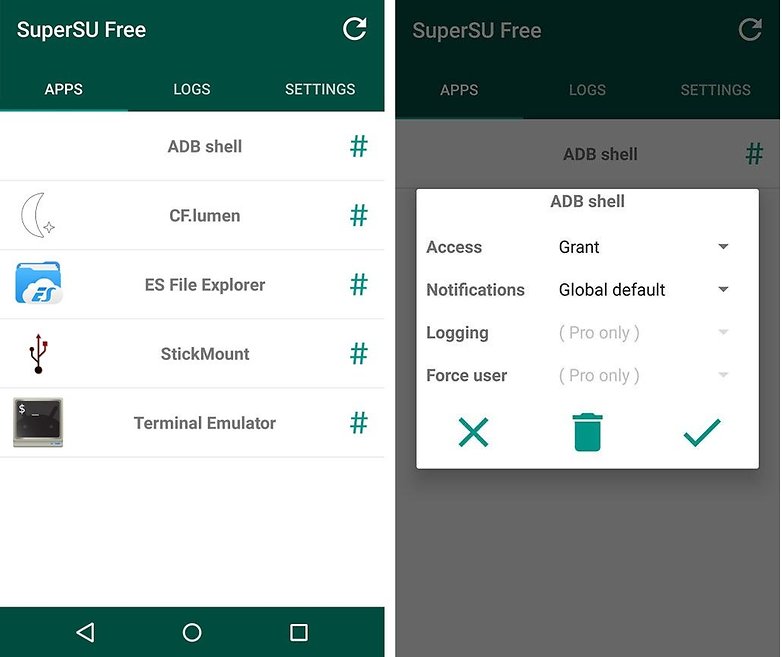
Os privilégios de root irão transformar você de um usuário regular, com permissões restritas, num usuário com acessos total e privilégiado ao sistema. A maneira mais simples de gerenciar permissões de root é instalando a ferramenta acima, o SuperSU.
Para que serve o root?
Como dito antes, você poderá obter controle total do seu aparelho. Isso significa instalar as ROMS customizadas (versões do sistema operacional criadas por entusiastas) que quiser, eliminar ou congelar aplicativos normalmente não modificáveis e efetuar backups completos de dados e aplicativos. Entretanto, mesmo sem instalar uma ROM customizada você ainda poderá efetuar uma série de mudanças na aparência e funcionamento de seu celular usando o aplicativo Xposed Framework e seus inúmeros módulos.
Como funciona o root?
Para habilitar as permissões de root é usado são usadas ferramentas ou scripts que procuram vulnerabilidades no sistema operacional que permitam a um usuário normal herdar os "poderes" de root. Este tipo de "ataque" ao sistema é conhecido como Privilege Escalation (Elevação de Privilégios)
O processo exato varia de aparelho para aparelho, até mesmo entre variantes de um mesmo modelo. O modo mais fácil é usar aplicativos que prometem "root com um clique", como o KingoRoot, KingRoot, OneClickRoot e outros.
Mas é preciso tomar cuidado com eles. A compatibilidade depende de qual aparelho você tem, do fabricante e até mesmo de qual versão do Android você está usando. Então, mesmo que um app diga ser compatível com seu smartphone, ela pode não funcionar se ele estiver atualizado. Isto porque estes apps funcionam procurando vulnerabilidades nos aparelhos, que podem já ter sido corrigidas em versões mais novas do sistema.
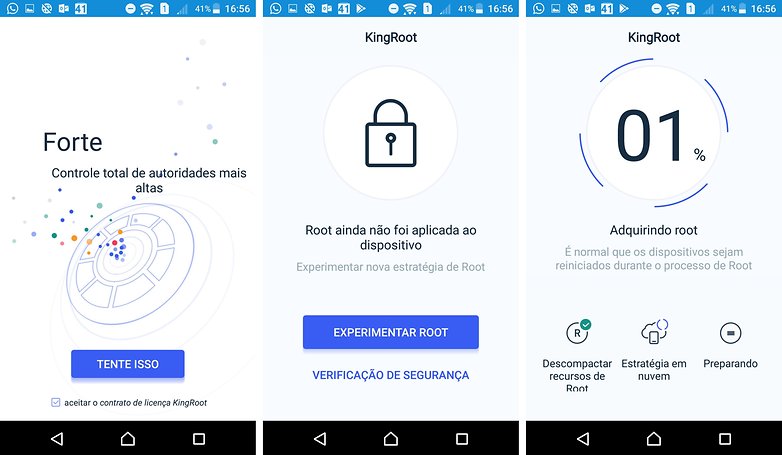
Além disso, muitas vezes estes apps instalam "bloatware" como "ferramentas de limpeza" e outras coisas em seu aparelho, se se livrar dos apps indesejados, e não ganhar mais deles, é o principal motivo para muita gente fazer root.
Também há preocupações de segurança: estes apps tem acesso de root, ou seja, podem fazer o que quiserem com o seu smartphone. Nada impede um desenvolvedor mal-intencionado de empacotar uma delas com um punhado de malware. Portanto recomendamos, se possível fazer o processo de root manualmente. Pode ser mais complexo, mas é mais seguro.
Perderei a garantia do meu celular se fizer root?
A resposta mais curta é: sim. Infelizmente, a maioria dos fabricantes afirma que root invalida a garantia do celular.. Alguns métodos permitem a volta ao sistema de fábrica mais facilmente, o que em teoria restauraria também a garantia, mas é possível que o processo de root deixe "resíduos" em seu aparelho que podem ser detectados pelo fabricante, mesmo se o root for revertido.
Em alguns aparelhos, como os da Samsung, há um "contador" interno que identifica quantas vezes o sistema do aparelho foi atualizado. Se este contador não "bater" com o que o fabricante espera para sua versão do sistema, é um indício de que você fez root, e seu aparelho perde a garantia. Infelizmente, é difícil burlar este sistema.
Resumindo a história: root tem vantagens, mas você deve realizar o processo por sua própria conta e risco. Esteja preparado para ser "abandonado" pelo fabricante se surgirem problemas. Antes de começar, consulte fóruns e sites especializados e leia TODA a documentação disponível e os comentários de outros usuários. Assim você saberá o que esperar.
Confira o que algumas fabricantes dizem sobre o root:
- LG: A LG liberou o oficialmente o bootloader de alguns de seus aparelhos. Com isso, fica mais fácil instalar versões modificadas do sistema operacional. Contudo, o root num dispositivo da marca anula sua garantia de fábrica.
- Motorola: A Motorola facilita o desbloqueio do bootloader (gerenciador de boot) de alguns modelos de seus smartphones com um site específico e instruções para isso, mas avisa que a partir do momento em que o processo é feito, a garantia é invalidada.
- Quantum: A fabricante Curitibana avisa que root invalida a garantia do aparelho. Além disso, em alguns aparelhos da marca (como o Quantum SKY) ainda não há um método de root seguro disponível.
- Samsung: A Samsung é mais linha dura nesse sentido, e nos disse que o root modifica o dispositivo de forma não assegurada pela marca, invalidando toda a garantia do dispositivo. Isso vale também para modelos comprados em operadoras ou direto com o varejista.
- Sony: A Sony é menos rígida. Segundo a empresa, cada caso é avaliado separadamente. Se, durante uma análise técnica, for identificado que o processo de root não interfere no problema indicado pelo usuário, a garantia dificilmente será anulada. Caso contrário, a garantia de fábrica é perdida.
- Xiaomi: Desde 2016 a Xiaomi bloqueia o bootloader de seus aparelhos, mas fornece uma ferramenta para desbloqueio. O processo não invalida a garantia, desde que o defeito apresentado pelo aparelho seja relacionado ao hardware.
Será que meu celular já tem root? Dá pra confirmar?
Há malwares podem infectar seu dispositivo, escalando privilégios e conseguindo o status de root. Ou você já rooteou seu aparelho, mas voltou atrás e eliminou o root. Ou você comprou o dispositivo usado de um amigo e não tem certeza do status do aparelho. Em todos os casos, é útil checar se seu telefone está ou não rooteado. Existem dois aplicativos que são frequentemente utilizados nesta tarefa
O primeiro foi desenvolvido por Jared Rummler, chefe da JRummy Apps. Trata-se do Root Checker, um aplicativo gratuito que verifica em questão de segundos se o seu dispositivo foi rooteado. Se o resultado for positivo, o aplicativo também mostrará os aplicativos que estão usando os direitos de superusuário.
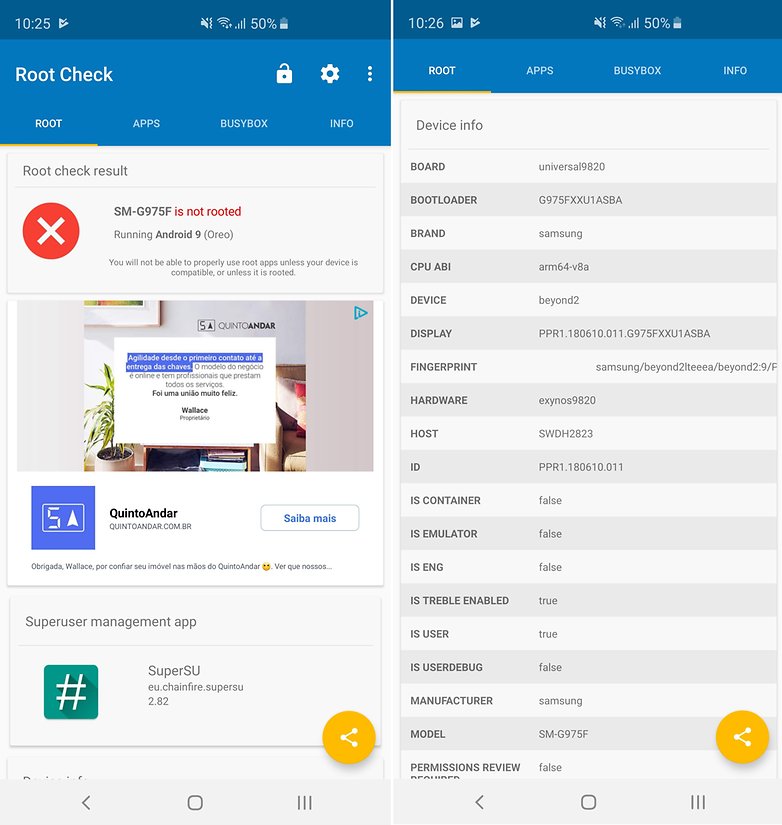
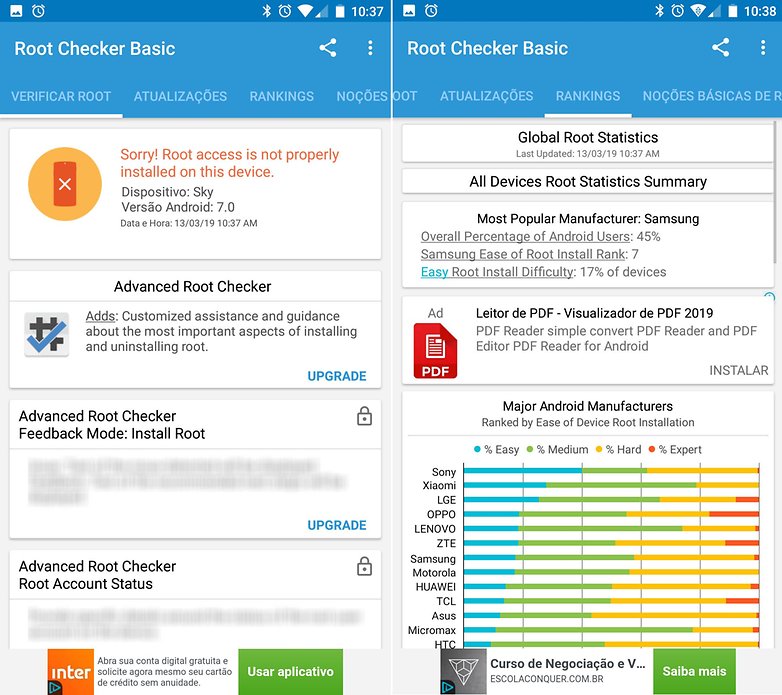
O segundo aplicativo é de um desenvolvedor chamado de joeykrim. O seu Root Checker é tão simples quanto o anterior, com a diferença de que, nesse caso, você pode visualizar um pequeno glossário com as informações mais importantes sobre o root no Android. Joeykrim também é conhecido pelo apelido de Root-Quiz.
O que ROM customizada?
Antes de tudo, vamos esclarecer o que é uma ROM. O termo vem de "Read Only Memory", os chips de memória somente para leitura (que não podem ser regravados) que continham o sistema operacional básico em antigos computadores portáteis, consoles de videogame e telefones celulares, entre outros dispositivos. Por analogia, também é aplicado ao conteúdo destes chips, também chamado de "imagem da ROM" ou "ROM Image".
No mundo Android, uma ROM é uma versão do sistema operacional que é instalada na memória interna do aparelho. Se você utiliza um smartphone Samsung, por exemplo, ele tem uma ROM de fábrica com o sistema operacional , a interface proprietária da fabricante (a TouchWiz ou OneUI) e todos os apps pré-instalados.
Uma ROM customizada é uma versão modificada do sistema operacional, desenvolvida por entusiastas que modificam a ROM original ou criam uma nova a partir do código-fonte do sistema operacional Android (chamado AOSP, Android Open Source Project). Tais ROMs frequentemente oferecem mais recursos, melhor capacidade de personalização e até mesmo versões do sistema operacional mais recentes do que a ROM nativa.
Benefícios do root no Android
Há vários motivos para fazer root. Usar um dos muitos aplicativos úteis que demandam esse recurso, a capacidade de desinstalar aplicativos indesejados (bloatware) que vieram instalados de fábrica e o desejo de experimentar ROMs personalizadas e com novos recursos são as razões mais comuns.
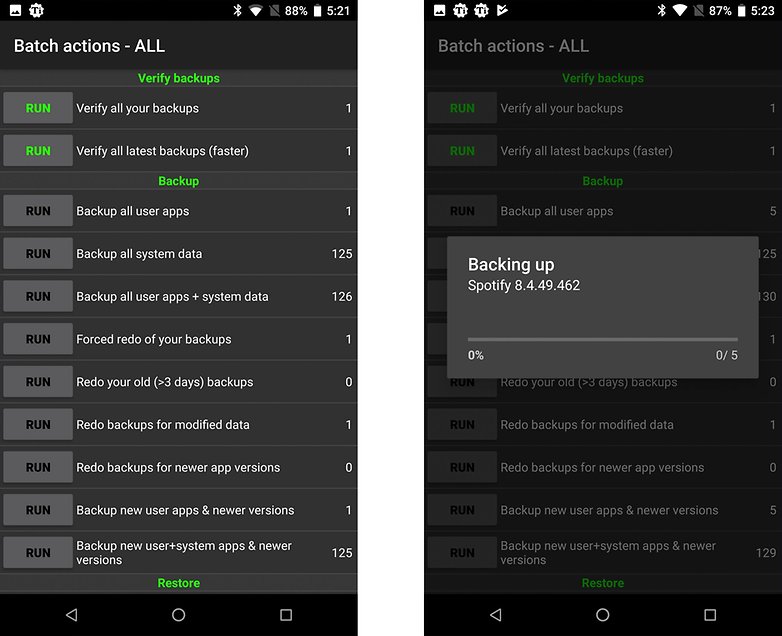
Backups completos do sistema, por exemplo, são mais fáceis com root. Você poderá instalar um aplicativo como o Titanium Backup e realizar backups completos (incluindo aplicativos e dados) periodicamente, então se algo acontecer com seu telefone, você sempre poderá recorrer ao backup para restaurá-lo.
O acesso root também permite que você altere os mínimos detalhes do comportamenteo e aparência do sistema Android. Você pode instalar uma ROM personalizada para uma reforma completa, mas também pode fazer pequenos ajustes usando apps como o Xposed Framework . Talvez você só queira instalar uma nova animação de boot, ajustar algumas configurações de áudio ou fazer o overclock da CPU para ganhar mais desempenho. Tudo isso é possível com root.
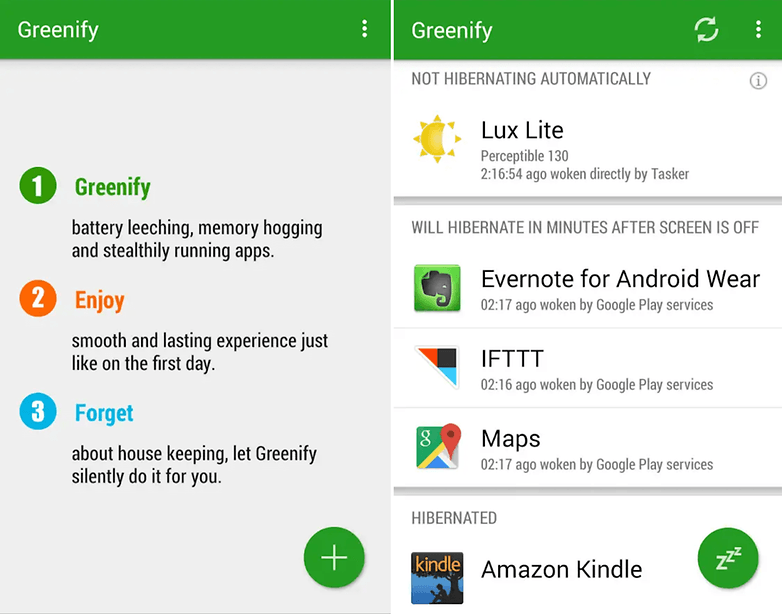
Com acesso root, você também pode melhorar a autonomia de bateria do seu Android através de técnicas como o undervolting do processador (fazê-lo funcionar em uma voltagem menor do que aquela para a qual ele foi projetado, reduzindo o consumo de energia) ou usando um modo de hibernação automático com aplicativos como o Greenify. Como mencionado acima, a remoção de aplicativos pré-instalados também diminui a carga sobre o sistema, melhorando a vida da bateria.
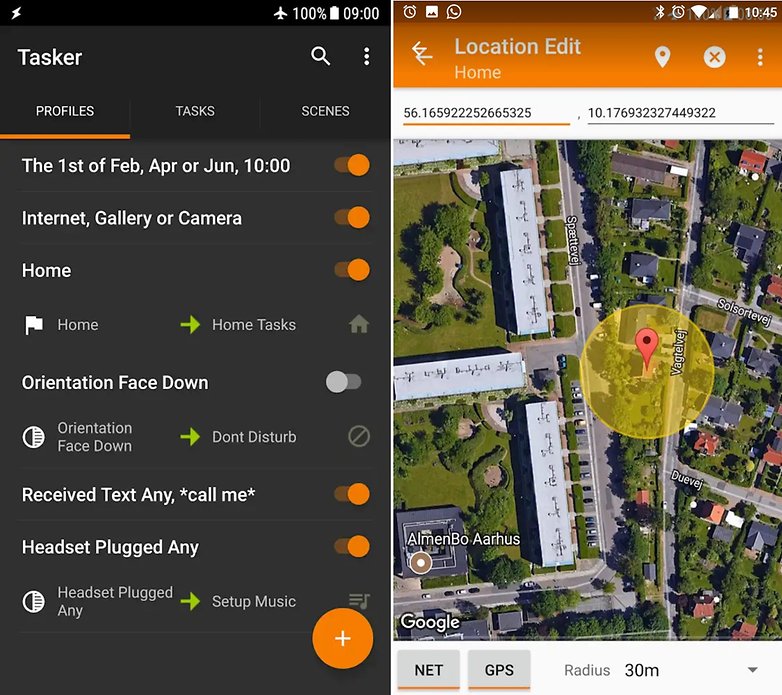
Bloqueadores de anúncios e a automação completa do sistema com apps como o Tasker são outras duas razões para rotear o Android. Mas as suas razões esta empreitada são algo subjetivo. Você poderá mudar muito, ou pouco do sistema. E não importa o quanto você esteja empenhado nesta mudança, o root te dará o caminho para que você chegue ao seu objetivo.
Por que você não deve fazer root no Android
Existem algumas razões, entre elas: você provavelmente vai anular a garantia do celular (veja a posição das fabricantes acima), o processo pode ser complicado e perigoso (especialmente para um usuário desatento) e, em muitos casos, você não receberá mais atualizações automáticas de sistema (OTA, Over-the-Air) do fabricante. Mas se você consegue fazer root, também é capaz de instalar atualizações (se disponíveis) manualmente.
Quando um smartphone está rooteado é mais fácil para um aplicativo malicioso se aproveitar das permissões do root e causar um belo estrafgo. Logo, você precisará ter um cuidado redobrado com apps instalados em dispositivos nessas condições. Cuidado superior ao que você já tem com o que está disponível na Play Store.
Outro ponto a considerar é que muitas Custom ROMs estão em franco desenvolvimento, em um estado que pode ser considerado um "beta perpétuo". É como o lema não oficial do Vale do Silício: "seja rápido e quebre as coisas". Novos recursos muitas vezes são mais importantes do que a estabilidade, e a chance de você encontrar bugs severos ou recursos incompletos é grande.
Se você precisar de mais motivos para não rotear um aparelho, acesso o artigo abaixo e consulte alguns tópicos que separamos com esse tema:
O que quer dizer flashear?
“Flashear” significa basicamente gravar uma nova ROM na memória interna de seu smartphone Android. O termo vem do tipo de memória usado para abrigar o sistema nestes aparelhos, chamado de Memória Flash.
O que é Custom Recovery?
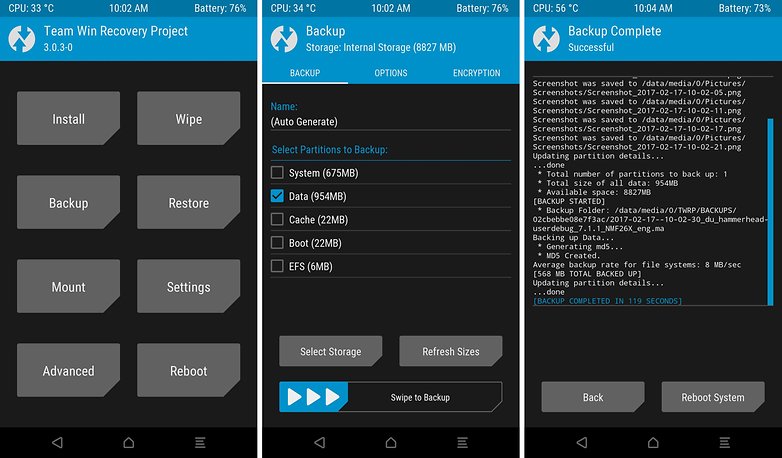
Recovery é um modo do sistema operacional Android onde podem ser efetuadas operações de recuperação do sistema e correção de problemas. Por Custom Recovery, entende-se a instalação de um sistema de recuperação diferente do original, mais abrangente, com mais recursos e capaz de instalar e recuperar ROMs customizadas. O Custom Recovery mais popular é o TWRP, da TeamWin Recovery Project.
Preciso de um computador para fazer root no Android?
Depende do aparelho. Alguns smartphones já podem ser rooteados com aplicativos que exploram as falhas de segurança do sistema, como os que já mencionamos anteriormente.
Preparando-se para fazer root
Não existe um processo de root universal que funciona em todos os milhares de aparelhos Android por aí. O processo depende muito do fabricante do aparelho, e ainda assim varia de dispositivo para dispositivo. Isto torna basicamente impossível dar instruções exatas, passo a passo, para todos os smartphones.
Dito isto, o site XDA-Developers, um dos mais importantes para a comunidade que gosta de "fuçar" o Android, tem uma lista bastante extensa de instruções para vários aparelhos. É lá que você deve procurar por instruções exatas para seu smartphone. Mas antes, é melhor se familiarizar com o processo de root em si antes de mergulhar nos detalhes.
O processo de root geralmente envolve três passos:
- Desbloqueio do bootloader
- Instalação de um novo Recovery
- Instalação de arquivos ou scripts que permitirão que você tenha acesso de root ao seu dispositivo.
O bootloader é o primeiro software inicializado em seu smartphone assim que ele é ligado, e é responsável por carregar o sistema operacional ou o sistema de Recovery. Um bootloader de fábrica é bloqueado para só aceitar a instalação e execução de software assinado digitalmente pelo fabricante de seu aparelho. As Custom Recovery e Custom ROMs não tem essa assinatura, é preciso modificar o bootloader para que ele aceite software não assinado.
Para descobrir como desbloquear o bootloader de seu aparelho, basta uma rápida busca no Google por termos como o nome do aparelho + "bootloader unlock" ou "desbloqueio bootloader". Há uma forma de fazer isso sem muitos problemas para a maioria dos smartphones mais populares.
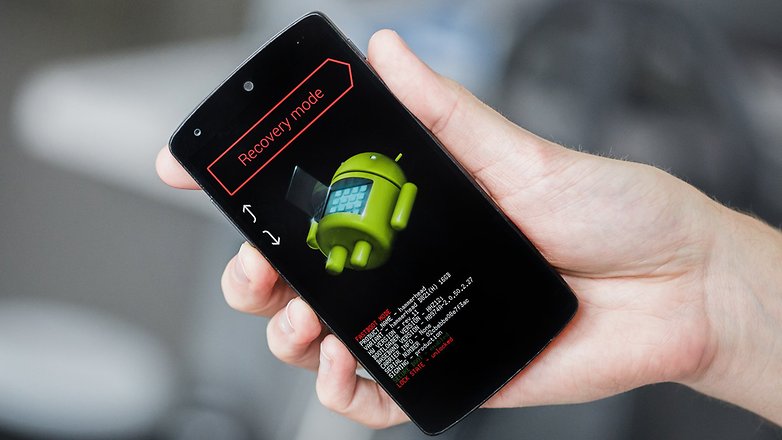
Depois de desbloquear o bootloader, você precisará de uma Custom Recovery para substituir o software de recuperação de sistema original. Para isso, você terá de se familiarizar com ferramentas de linha de comando, como ADB e Fastboot.
Como já dissemos, uma Custom Recovery permite instalar, ou "flashear", software customizado em seu smartphone. É com ela você poderá instalar ferramentas como o SuperSU ou Magisk, que lhe darão o acesso de root. A partir daí a diversão começa, e você pode começar a brincar com apps que exigem root, se livrar de bloatware ou instalar ROMs customizadas.
Se você tiver a sorte de ter um aparelho popular, pode experimentar um dos aplicativos de "root com um clique" que já mencionamos anteriormente. Quando funcionam, eles fazem todo o "trabalho sujo" para você, rápida e automaticamente.
Como faço root no meu smartphone?
Como dissemos, o processo varia bastante entre os fabricantes e dispositivos, então o que mostramos abaixo é apenas um "guia geral" sobre o que você pode esperar ao trabalhar com cada marca. Para instruções mais detalhadas, recomendamos a consulta ao excelente guia de root do XDA-Developers, que é constantemente atualizado.
Samsung
Antes de fazer root em um smartphone Samsung, devemos avisá-lo de que estes aparelhos tem contadores internos (Flash Counters) que registram quantas vezes a ROM foi gravada ou atualizada. Isto significa que se você fizer root em seu Galaxy, instalar qualquer ROM nele e tiver de enviá-lo para reparos, a Samsung poderá recusar o pedido já que as modificações que você fez não são cobertas pela garantia.
A Samsung não oferece mais "versões para desenvolvedor" de seus smartphones, e nas versões norte-americanas de seus carros-chefe mais recentes é notoriamente difícil fazer root (provavelmente resultado da influência das operadoras). Entretanto, nas versões internacionais as coisas tendem a ser muito mais fáceis.
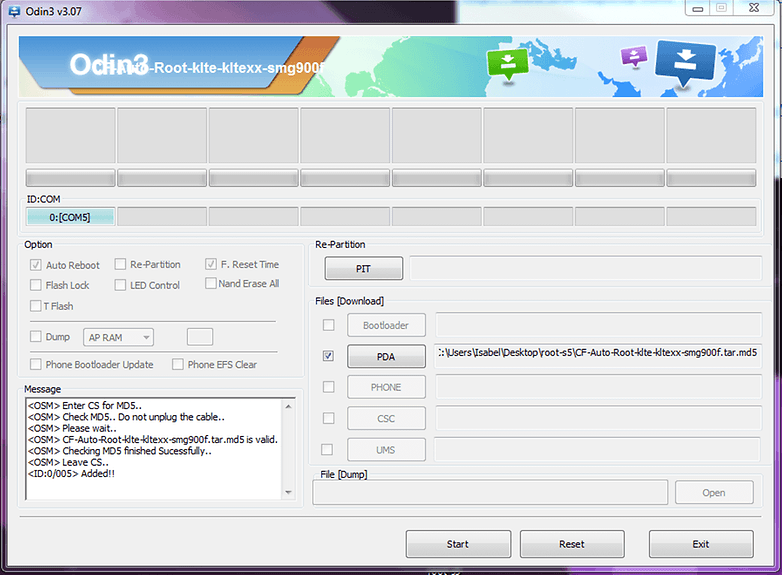
Se ainda assim você quiser "rootear" um smartphone Samsung, precisará se familiarizar com duas palavras únicas ao mundo dos Sul-Coreanos: Odin e Knox. Odin é a ferramenta que você precisará instalar em seu PC com Windows para poder "flashear" arquivos em seu smartphone (a versão Mac é chamada Heimdall).
Já o Knox é um recurso para segurança corporativa, e foi criado para que os usuários possam segmentar seus perfis de trabalho e pessoais, para que não tenham de carregar dois smartphones. Este recurso de segurança pode trazer problemas durante as tentativas de root, então você terá de encontrar uma forma de contorná-lo se ele estiver disponível em seu aparelho.
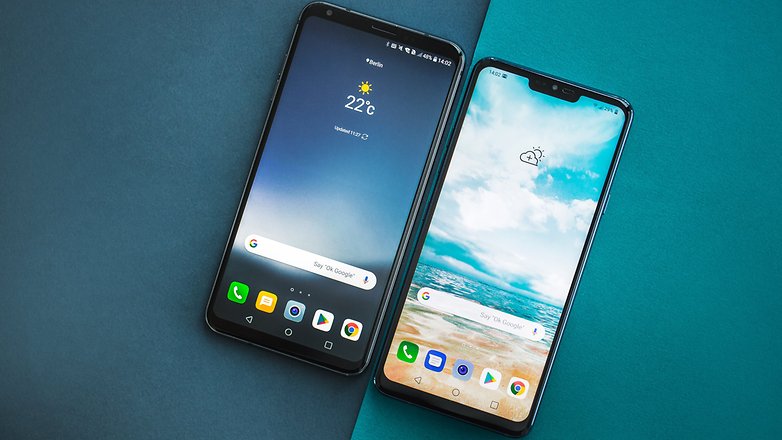
LG
Os smartphones da LG são uma verdadeira salada. alguns tem bootloaders que podem ser desbloqueados facilmente, outros requerem alguns truques para que possam ser quebrados. Há uma boa chance de que você estará invalidando sua garantia, e o nível de dificuldade pode depender da operadora que te vendeu o aparelho (neste ponto, aparelhos comprados nas lojas, os chamados "Retail", são sempre a melhor opção).
No passado a LG forneceu instruções para o desbloqueio do bootloader do LG G4, mas com a ressalva de que você estaria invalidando sua garantia.
Com os aparelhos da LG você pode fazer root manualmente usando um Custom Recovery depois de desbloquear o bootloader, ou usar das ferramentas de um clique. Depende de qual método você acha o mais confortável dependendo do seu nível de habilidade e tolerância aos riscos de segurança.
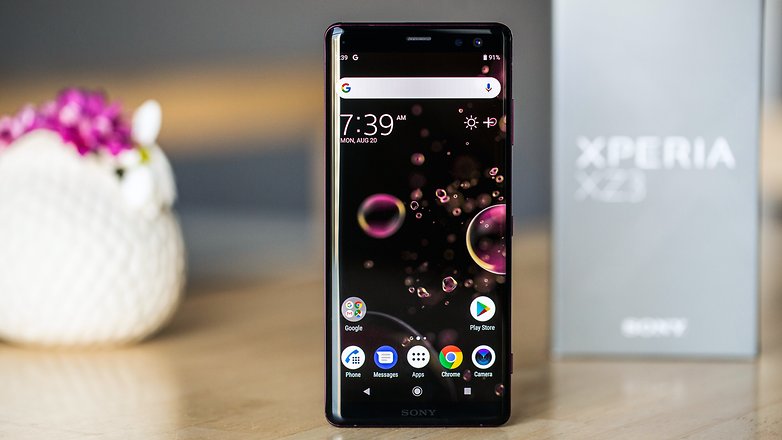
Sony
Dependendo de qual aparelho da Sony você tem - um com um bootloader desbloqueável ou não - o processo de root será um pouco diferente. Se o bootloader for oficialmente desbloqueável (veja a lista aqui) é muito mais fácil instalar uma Custom Recovery em seu Xperia e então fazer mais modificações flasheando arquivos ZIP.
Google Pixel e Nexus
A Google quer ajudar os desenvolvedores e entusiastas a fazer o que quiserem. Portanto, você não precisa solicitar um código ou permissão para desbloquear o bootloader de seu smartphone Nexus ou Pixel, o processo geralmente é muito simples, resumindo-se a alguns comandos no PC, e há imagens de fábrica que permitem recuperar seu aparelho caso você danifique o sistema de alguma forma. Dito isto, desbloquear o bootloader ainda pode invalidar sua garantia.
Motorola
A Motorola tem uma página oficial de suporte para guiá-lo durante o processo de desboqueio do bootloader. Depois que isso for feito, você pode fazer o root manualmente. Mas se o seu aparelho for vinculado a uma operadora (Ei, Verizon!) e não puder ser desbloqueado oficialmente, você terá de experimentar a sorte com algumas das ferramentas de um clique.
Huawei/Honor
Para desbloquear o bootloader de um aparelho da Huawei ou Honor, bastava preencher um formulário e pedir um código para deslboqueio do bootloader. Infelizmente a Huawei decidiu parar de fornecer estes códigos meses atrás, o que torna muito mais difícil a tarefa de fazer root. Infelizmente, você terá de se contentar em tentar a sorte com uma das ferramentas de um clique.
Xiaomi
Desde 2016 a Xiaomi bloqueia o bootloader de todos os seus smartphones, mas oferece uma ferramenta oficial para realizar o desbloqueio e um FAQ em seus fóruns. O incômodo é que, após instalar a ferramenta e pedir o desbloqueio, é necessário esperar 72 horas para que ele seja realizado. Segundo a empresa, isso é para evitar que aparelhos roubados sejam "reflasheados" e revendidos.
E aí, conseguiu achar todas as informações que você procurava neste artigo? Já fez root em seu aparelho? Tem mais alguma sugestão? Comente aqui.






Vocês não falaram sobre os celulares ASUS
Eu quero comer bala de chulê, vômito, peixe morto, lavar prato suja, marshmallow torrado, maria fedida e fazer cocô de oo, abacaxi, tõ, toalha, um, milho, gel, abajer, ee, forma forma, saia, praia, feijão, felipe, ito, iapito, doutor hilton, davo, dane, foto foto, fantasma, popozão, pepe, pepeano, tiripu, shooping novo, paciente, cesto, victor, filme, pedro, amendoim, ovo, dane, sapo, péu, desenho, estranho, pomije, barra, cachorro, GPS, dinossauro, buffy pop tá bom tiby uano quibe comó, a boba, amarelo, certo, acaquelo, oooobio abacate azeitona macacão aa brócolis e de vovozinha se você quer mesmo comer balas nojentas bizarros e melequentas, ir pra morte, fazer cocô de tõ tõ tõ tõ tõ, tomar café com leite e ler uma revista em quadrinhos você vai tem que falar para os fofornos, guardas, ladrões, policiais, homens do saco, bruxas, 44 gatos, zhu zhu pets, poneys, alunos da classe, natugato e bebês pararem de cagar nas calças, soltando gases fedorentos, segurando tone e se maldiar de salvador para guarulhos de propósito em lugares falsos isso quebra a força do objetivo de conselho da lei ou pare de xingar minhas ilhas e segunda coisa eles só estavam com dor de barriga é muito feio falar frases falsas que contém comportamentos ofensivos isso pode arriscar seu risco acarretando perda de valor para se sobreviver na terra e você pode acarretar riscos de ser denunciado da família posso nada
0,000 5,000 10,00 15,00 20,00 25,00 30,00 35,00 40,00 45,00 50,00 55,00 60,00 65,00 70,00 75,00 80,00 85,00 90,00 95,00 100,0 105,0 110,0 115,0 120,0 125,0 130,0 135,0 140,0 145,0 150,0 155,0 160,0 165,0 170,0 175,0 180,0 185,0 190,0 195,0 200,0 205,0 210,0 215,0 220,0 225,0 230,0 235,0 240,0 245,0 250,0 255,0 260,0 265,0 270,0 275,0 280,0 285,0 290,0 295,0 300,0 305,0 310,0 315,0 320,0 325,0 330,0 335,0 340,0 345,0 350,0 355,0 360,0 365,0 370,0 375,0 380,0 385,0 390,0 395,0 400,0 405,0 410,0 415,0 420,0 425,0 430,0 435,0 440,0 445,0 450,0 455,0 460,0 465,0 470,0 475,0 480,0 485,0 490,0 495,0 500,0 505,0 510,0 515,0 520,0 525,0 530,0 535,0 540,0 545,0 550,0 555,0 560,0 565,0 570,0 575,0 580,0 585,0 590,0 595,0 600,0 605,0 610,0 615,0 620,0 625,0 630,0 635,0 640,0 645,0 650,0 655,0 660,0 665,0 670,0 675,0 680,0 685,0 690,0 695,0 700,0 705,0 710,0 715,0 720,0 725,0 730,0 735,0 740,0 745,0 750,0 755,0 760,0 765,0 770,0 775,0 780,0 785,0 790,0 795,0 800,0 805,0 810,0 815,0 820,0 825,0 830,0 835,0 840,0 845,0 850,0 855,0 860,0 865,0 870,0 875,0 880,0 885,0 890,0 895,0 900,0 905,0 910,0 915,0 920,0 925,0 930,0 935,0 940,0 945,0 950,0 955,0 960,0 965,0 970,0 975,0 980,0 985,0 990,0 995,0 100 100 101 101 102 102 103 103 104 104 105 105 106 106 107 107 108 108 109 109 110 110 111 111 112 112 113 113 114 114 115 115 116 116 117 117 118 118 119 119 120 120 121 121 122 122 123 123 124 124 125 125 126 126 127 127 128 128 129 129 130 130 131 131 132 132 133 133 134 134 135 135 136 136 137 137 138 138 139 139 140 140 141 141 142 142 143 143 144 144 145 145 146 146 147 147 148 148 149 149 150 150 151 151 152 152 153 153 154 154 155 155 156 156 157 157 158 158 159 159 160 160 161 161 162 162 163 163 164 164 165 165 166 166 167 167 168 168 169 169 170 170 171 171 172 172 173 173 174 174 175 175 176 176 177 177 178 178 179 179 180 180 181 181 182 182 183 183 184 184 185 185 186 186 187 187 188 188 189 189 190 190 191 191 192 192 193 193 194 194 195 195 196 196 197 197 198 198 199 199 200 200 201 201 202 202 203 203 204 204 205 205 206 206 207 207 208 208 209 209 210 210 211 211 212 212 213 213 214 214 215 215 216 216 217 217 218 218 219 219 220 220 221 221 222 222 223 223 224 224 225 225 226 226 227 227 228 228 229 229 230 230 231 231 232 232 233 233 234 234 235 235 236 236 237 237 238 238 239 239 240 240 241 241 242 242 243 243 244 244 245 245 246 246 247 247 248 248 249 249 250 250 251 251 252 252 253 253 254 254 255 255 256 256 257 257 258 258 259 259 260 260 261 261 262 262 263 263 264 264 265 265 266 266 267 267 268 268 269 269 270 270 271 271 272 272 273 273 274 274 275 275 276 276 277 277 278 278 279 279 280 280 281 281 282 282 283 283 284 284 285 285 286 286 287 287 288 288 289 289 290 290 291 291 292 292 293 293 294 294 295 295 296 296 297 297 298 298 299 299 300 300 301 301 302 302 303 303 304 304 305 305 306 306 307 307 308 308 309 309 310 310 311 311 312 312 313 313 314 314 315 315 316 316 317 317 318 318 319 319 320 320 321 321 322 322 323 323 324 324 325 325 326 326 327 327 328 328 329 329 330 330 331 331 332 332 333 333 334 334 335 335 336 336 337 337 338 338 339 339 340 340 341 341 342 342 343 343 344 344 345 345 346 346 347 347 348 348 349 349 350 350 351 351 352 352 353 353 354 354 355 355 356 356 357 357 358 358 359 359 360 360 361 361 362 362 363 363 364 364 365 365 366 366 367 367 368 368 369 369 370 370 371 371 372 372 373 373 374 374 375 375 376 376 377 377 378 378 379 379 380 380 381 381 382 382 383 383 384 384 385 385 386 386 387 387 388 388 389 389 390 390 391 391 392 392 393 393 394 394 395 395 396 396 397 397 398 398 399 399 400 400 401 401 402 402 403 403 404 404 405 405 406 406 407 407 408 408 409 409 410 410 411 411 412 412 413 413 414 414 415 415 416 416 417 417 418 418 419 419 420 420 421 421 422 422 423 423 424 424 425 425 426 426 427 427 428 428 429 429 430 430 431 431 432 432 433 433 434 434 435 435 436 436 437 437 438 438 439 439 440 440 441 441 442 442 443 443 444 444 445 445 446 446 447 447 448 448 449 449 450 450 451 451 452 452 453 453 454 454 455 455 456 456 457 457 458 458 459 459 460 460 461 461 462 462 463 463 464 464 465 465 466 466 467 467 468 468 469 469 470 470 471 471 472 472 473 473 474 474 475 475 476 476 477 477 478 478 479 479 480 480 481 481 482 482 483 483 484 484 485 485 486 486 487 487 488 488 489 489 490 490 491 491 492 492 493 493 494 494 495 495 496 496 497 497 498 498 499 499 500 500 501 501 502 502 503 503 504 504 505 505 506 506 507 507 508 508 509 509 510 510 511 511 512 512 513 513 514 514 515 515 516 516 517 517 518 518 519 519 520 520 521 521 522 522 523 523 524 524 525 525 526 526 527 527 528 528 529 529 530 530 531 531 532 532 533 533 534 534 535 535 536 536 537 537 538 538 539 539 540 540 541 541 542 542 543 543 544 544 545 545 546 546 547 547 548 548 549 549 550 550 551 551 552 552 553 553 554 554 555 555 556 556 557 557 558 558 559 559 560 560 561 561 562 562 563 563 564 564 565 565 566 566 567 567 568 568 569 569 570 570 571 571 572 572 573 573 574 574 575 575 576 576 577 577 578 578 579 579 580 580 581 581 582 582 583 583 584 584 585 585 586 586 587 587 588 588 589 589 590 590 591 591 592 592 593 593 594 594 595 595 596 596 597 597 598 598 599 599 600 600 601 601 602 602 603 603 604 604 605 605 606 606 607 607 608 608 609 609 610 610 611 611 612 612 613 613 614 614 615 615 616 616 617 617 618 618 619 619 620 620 621 621 622 622 623 623 624 624 625 625 626 626 627 627 628 628 629 629 630 630 631 631 632 632 633 633 634 634 635 635 636 636 637 637 638 638 639 639 640 640 641 641 642 642 643 643 644 644 645 645 646 646 647 647 648 648 649 649 650 650 651 651 652 652 653 653 654 654 655 655 656 656 657 657 658 658 659 659 660 660 661 661 662 662 663 663 664 664 665 665 666 666 667 667 668 668 669 669 670 670 671 671 672 672 673 673 674 674 675 675 676 676 677 677 678 678 679 679 680 680 681 681 682 682 683 683 684 684 685 685 686 686 687 687 688 688 689 689 690 690 691 691 692 692 693 693 694 694 695 695 696 696 697 697 698 698 699 699 700 700 701 701 702 702 703 703 704 704 705 705 706 706 707 707 708 708 709 709 710 710 711 711 712 712 713 713 714 714 715 715 716 716 717 717 718 718 719 719 720 720 721 721 722 722 723 723 724 724 725 725 726 726 727 727 728 728 729 729 730 730 731 731 732 732 733 733 734 734 735 735 736 736 737 737 738 738 739 739 740 740 741 741 742 742 743 743 744 744 745 745 746 746 747 747 748 748 749 749 750 750 751 751 752 752 753 753 754 754 755 755 756 756 757 757 758 758 759 759 760 760 761 761 762 762 763 763 764 764 765 765 766 766 767 767 768 768 769 769 770 770 771 771 772 772 773 773 774 774 775 775 776 776 777 777 778 778 779 779 780 780 781 781 782 782 783 783 784 784 785 785 786 786 787 787 788 788 789 789 790 790 791 791 792 792 793 793 794 794 795 795 796 796 797 797 798 798 799 799 800 800 801 801 802 802 803 803 804 804 805 805 806 806 807 807 808 808 809 809 810 810 811 811 812 812 813 813 814 814 815 815 816 816 817 817 818 818 819 819 820 820 821 821 822 822 823 823 824 824 825 825 826 826 827 827 828 828 829 829 830 830 831 831 832 832 833 833 834 834 835 835 836 836 837 837 838 838 839 839 840 840 841 841 842 842 843 843 844 844 845 845 846 846 847 847 848 848 849 849 850 850 851 851 852 852 853 853 854 854 855 855 856 856 857 857 858 858 859 859 860 860 861 861 862 862 863 863 864 864 865 865 866 866 867 867 868 868 869 869 870 870 871 871 872 872 873 873 874 874 875 875 876 876 877 877 878 878 879 879 880 880 881 881 882 882 883 883 884 884 885 885 886 886 887 887 888 888 889 889 890 890 891 891 892 892 893 893 894 894 895 895 896 896 897 897 898 898 899 899 900 900 901 901 902 902 903 903 904 904 905 905 906 906 907 907 908 908 909 909 910 910 911 911 912 912 913 913 914 914 915 915 916 916 917 917 918 918 919 919 920 920 921 921 922 922 923 923 924 924 925 925 926 926 927 927 928 928 929 929 930 930 931 931 932 932 933 933 934 934 935 935 936 936 937 937 938 938 939 939 940 940 941 941 942 942 943 943 944 944 945 945 946 946 947 947 948 948 949 949 950 950 951 951 952 952 953 953 954 954 955 955 956 956 957 957 958 958 959 959 960 960 961 961 962 962 963 963 964 964 965 965 966 966 967 967 968 968 969 969 970 970 971 971 972 972 973 973 974 974 975 975 976 976 977 977 978 978 979 979 980 980 981 981 982 982 983 983 984 984 985 985 986 986 987 987 988 988 989 989 990 990 991 991 992 992 993 993 994 994 995 995 996 996 997 997 998 998 999 999 1,0 1,0 1,0 1,0 1,0 1,0 1,1 1,1 1,1 1,1 1,1 1,1 1,2 1,2 1,2 1,2 1,2 1,2 1,3 1,3 1,3 1,3 1,3 1,3 1,4 1,4 1,4 1,4 1,4 1,4 1,5 1,5 1,5 1,5 1,5 1,5 1,6 1,6 1,6 1,6 1,6 1,6 1,7 1,7 1,7 1,7 1,7 1,7 1,8 1,8 1,8 1,8 1,8 1,8 1,9 1,9 1,9 1,9 1,9 1,9 2,0 2,0 2,0 2,0 2,0 2,0 2,1 2,1 2,1 2,1 2,1 2,1 2,2 2,2 2,2 2,2 2,2 2,2 2,3 2,3 2,3 2,3 2,3 2,3 2,4 2,4 2,4 2,4 2,4 2,4 2,5 2,5 2,5 2,5 2,5 2,5 2,6 2,6 2,6 2,6 2,6 2,6 2,7 2,7 2,7 2,7 2,7 2,7 2,8 2,8 2,8 2,8 2,8 2,8 2,9 2,9 2,9 2,9 2,9 2,9 3,0 3,0 3,0 3,0 3,0 3,0 3,1 3,1 3,1 3,1 3,1 3,1 3,2 3,2 3,2 3,2 3,2 3,2 3,3 3,3 3,3 3,3 3,3 3,3 3,4 3,4 3,4 3,4 3,4 3,4 3,5 3,5 3,5 3,5 3,5 3,5 3,6 3,6 3,6 3,6 3,6 3,6 3,7 3,7 3,7 3,7 3,7 3,7 3,8 3,8 3,8 3,9 3,9 3,9 4,0 4,0 4,0 4,0 4,0 4,0 4,1 4,1 4,1 4,1 4,1 4,1 4,2 4,2 4,2 4,2 4,2 4,2 4,3 4,3 4,3 4,3 4,3 4,3 4,4 4,4 4,4 4,4 4,4 4,4 4,5 4,5 4,5 4,5 4,5 4,5 4,6 4,6 4,6 4,6 4,6 4,6 4,7 4,7 4,7 4,7 4,7 4,7 4,8 4,8 4,8 4,8 4,8 4,8 4,9 4,9 4,9 4,9 4,9 4,9 5,0 5,0 5,0 5,0 5,0 5,0 5,1 5,1 5,1 5,1 5,1 5,1 5,2 5,2 5,2 5,2 5,2 5,2 5,3 5,3 5,3 5,3 5,3 5,3 5,4 5,4 5,4 5,4 5,4 5,4 5,5 5,5 5,5 5,5 5,5 5,5 5,6 5,6 5,6 5,6 5,6 5,6 5,7 5,7 5,7 5,7 5,7 5,7 5,8 5,8 5,8 5,8 5,8 5,8 5,9 5,9 5,9 5,9 5,9 5,9 6,0 6,0 6,0 6,0 6,0 6,0 6,1 6,1 6,1 6,1 6,1 6,1 6,2 6,2 6,2 6,2 6,2 6,2 6,3 6,3 6,3 6,3 6,3 6,3 6,4 6,4 6,4 6,4 6,4 6,4 6,5 6,5 6,5 6,5 6,5 6,5 6,6 6,6 6,6 6,6 6,6 6,6 6,7 6,7 6,7 6,7 6,7 6,7 6,8 6,8 6,8 6,8 6,8 6,8 6,9 6,9 6,9 6,9 6,9 6,9 7,0 7,0 7,0 7,0 7,0 7,0 7,1 7,1 7,1 7,1 7,1 7,1 7,2 7,2 7,2 7,2 7,2 7,2 7,3 7,3 7,3 7,3 7,3 7,3 7,4 7,4 7,4 7,4 7,4 7,4 7,5 7,5 7,5 7,5 7,5 7,5 7,6 7,6 7,6 7,6 7,6 7,6 7,7 7,7 7,7 7,7 7,7 7,7 7,8 7,8 7,8 7,8 7,8 7,8 7,9 7,9 7,9 7,9 7,9 7,9 8,0 8,0 8,0 8,0 8,0 8,0 8,1 8,1 8,1 8,1 8,1 8,1 8,2 8,2 8,2 8,2 8,2 8,2 8,3 8,3 8,3 8,3 8,3 8,3 8,4 8,4 8,4 8,4 8,4 8,4 8,5 8,5 8,5 8,5 8,5 8,5 8,6 8,6 8,6 8,6 8,6 8,6 8,7 8,7 8,7 8,7 8,7 8,7 8,8 8,8 8,8 8,8 8,8 8,8 8,9 8,9 8,9 8,9 8,9 8,9 9,0 9,0 9,0 9,0 9,0 9,0 9,1 9,1 9,1 9,1 9,1 9,1 9,2 9,2 9,2 9,2 9,2 9,2 9,3 9,3 9,3 9,3 9,3 9,3 9,4 9,4 9,4 9,4 9,4 9,4 9,5 9,5 9,5 9,5 9,5 9,5 9,6 9,6 9,6 9,6 9,6 9,6 9,6 9,7 9,7 9,7 9,7 9,7 9,8 9,8 9,8 9,8 9,8 9,8 9,9 9,9 9,9 9,9 9,9 9,9 10,0 10,0 10,0 10,0 10,0 10,0 10,1 10,1 10,1 10,1 10,1 10,1 10,2 10,2 10,2 10,2 10,2 10,2 10,3 10,3 10,3 10,3 10,3 10,3 10,4 10,4 10,4 10,4 10,4 10,4 10,5 10,5 10,5 10,5 10,5 10,5 10,6 10,6 10,6 10,6 10,6 10,6 10,7 10,7 10,7 10,7 10,7 10,7 10,8 10,8 10,8 10,8 10,8 10,8 10,9 10,9 10,9 10,9 10,9 10,9 11,0 11,0 11,0 11,0 11,0 11,0 11,1 11,1 11,1 11,1 11,1 11,1 11,2 11,2 11,2 11,2 11,2 11,2 11,3 11,3 11,3 11,3 11,3 11,3 11,4 11,4 11,4 11,4 11,4 11,4 11,5 11,5 11,5 11,5 11,5 11,5 11,6 11,6 11,6 11,6 11,6 11,6 11,7 11,7 11,7 11,7 11,7 11,7 11,8 11,8 11,8 11,8 11,8 11,8 11,9 11,9 11,9 11,9 11,9 11,9 12,0 12,0 12,0 12,0 12,0 12,0 12,1 12,1 12,1 12,1 12,1 12,1 12,2 12,2 12,2 12,2 12,2 12,2 12,3 12,3 12,3 12,3 12,3 12,3 12,4 12,4 12,4 12,4 12,4 12,4 12,5 12,5 12,5 12,5 12,5 12,5 12,6 12,6 12,6 12,6 12,6 12,6 12,7 12,7 12,7 12,7 12,7 12,7 12,8 12,8 12,8 12,8 12,8 12,8 12,9 12,9 12,9 12,9 12,9 12,9 13,0 13,0 13,0 13,0 13,0 13,0 13,1 13,1 13,1 13,1 13,1 13,1 13,2 13,2 13,2 13,2 13,2 13,2 13,3 13,3 13,3 13,3 13,3 13,3 13,4 13,4 13,4 13,4 13,4 13,4 13,5 13,5 13,5 13,5 13,5 13,5 13,6 13,6 13,6 13,6 13,6 13,6 13,7 13,7 13,7 13,7 13,7 13,7 13,8 13,8 13,8 13,8 13,8 13,8 13,9 13,9 13,9 13,9 13,9 13,9 14,0 14,0 14,0 14,0 14,0 14,0 14,1 14,1 14,1 14,1 14,1 14,1 14,2 14,2 14,2 14,2 14,2 14,2 14,3 14,3 14,3 14,3 14,3 14,3 14,4 14,4 14,4 14,4 14,4 14,4 14,5 14,5 14,5 14,5 14,5 14,5 14,6 14,6 14,6 14,6 14,6 14,6 14,7 14,7 14,7 14,7 14,7 14,7 14,8 14,8 14,8 14,8 14,8 14,8 14,9 14,9 14,9 14,9 14,9 14,9 15,0 15,0 15,0 15,0 15,0 15,0 15,1 15,1 15,1 15,1 15,1 15,1 15,2 15,2 15,2 15,2 15,2 15,2 15,3 15,3 15,3 15,3 15,3 15,3 15,4 15,4 15,4 15,4 15,4 15,4 15,5 15,5 15,5 15,5 15,5 15,5 15,6 15,6 15,6 15,6 15,6 15,6 15,7 15,7 15,7 15,7 15,7 15,7 15,8 15,8 15,8 15,8 15,8 15,8 15,9 15,9 15,9 15,9 15,9 15,9 16,0 16,0 16,0 16,0 16,0 16,0 16,1 16,1 16,1 16,1 16,1 16,1 16,2 16,2 16,2 16,2 16,2 16,2 16,3 16,3 16,3 16,3 16,3 16,3 16,4 16,4 16,4 16,4 16,4 16,4 16,5 16,5 16,5 16,5 16,5 16,5 16,6 16,6 16,6 16,6 16,6 16,6 16,7 16,7 16,7 16,7 16,7 16,7 16,8 16,8 16,8 16,8 16,8 16,8 16,9 16,9 16,9 16,9 16,9 16,9 17,0 17,0 17,0 17,0 17,0 17,0 17,1 17,1 17,1 17,1 17,1 17,1 17,2 17,2 17,2 17,2 17,2 17,2 17,3 17,3 17,3 17,3 17,3 17,3 17,4 17,4 17,4 17,4 17,4 17,4 17,5 17,5 17,5 17,5 17,5 17,5 17,6 17,6 17,6 17,6 17,6 17,6 17,7 17,7 17,7 17,7 17,7 17,7 17,8 17,8 17,8 17,9 17,9 17,9 17,9 17,9 17,9 18,0 18,0 18,0 18,0 18,0 18,1 18,1 18,1 18,1 18,2 18,2 18,2 18,2 18,2 18,2 18,3 18,3 18,3 18,3 18,3 18,3 18,4 18,4 18,4 18,4 18,4 18,4 18,5 18,5 18,5 18,5 18,5 18,5 18,6 18,6 18,6 18,6 18,6 18,6 18,7 18,7 18,7 18,7 18,7 18,7 18,8 18,8 18,8 18,8 18,8 18,8 18,9 18,9 18,9 18,9 18,9 18,9 19,0 19,0 19,0 19,0 19,0 19,0 19,1 19,1 19,1 19,1 19,1 19,1 19,2 19,2 19,2 19,2 19,2 19,2 19,3 19,3 19,3 19,3 19,3 19,3 19,4 19,4 19,4 19,4 19,4 19,4 19,5 19,5 19,5 19,5 19,5 19,5 19,6 19,6 19,6 19,6 19,6 19,6 19,7 19,7 19,7 19,7 19,7 19,7 19,8 19,8 19,8 19,8 19,8 19,8 19,9 19,9 19,9 19,9 19,9 19,9 20,0 20,0 20,0 20,0 20,0 20,0 20,1 20,1 20,1 20,1 20,1 20,1 20,2 20,2 20,2 20,2 20,2 20,2 20,3 20,3 20,3 20,3 20,3 20,3 20,4 20,4 20,4 20,4 20,4 20,4 20,5 20,5 20,5 20,5 20,5 20,5 20,6 20,6 20,6 20,6 20,6 20,6 20,7 20,7 20,7 20,7 20,7 20,7 20,8 20,8 20,8 20,8 20,8 20,8 20,9 20,9 20,9 20,9 20,9 20,9 21,0 21,0 21,0 21,0 21,0 21,0 21,1 21,1 21,1 21,1 21,1 21,1 21,2 21,2 21,2 21,2 21,2 21,2 21,3 21,3 21,3 21,3 21,3 21,3 21,4 21,4 21,4 21,4 21,4 21,4 21,5 21,5 21,5 21,5 21,5 21,5 21,6 21,6 21,6 21,6 21,6 21,6 21,7 21,7 21,7 21,8 21,8 21,8 21,8 21,8 21,8 21,9 21,9 21,9 21,9 21,9 21,9 22,0 22,0 22,0 22,0 22,0 22,0 22,1 22,1 22,1 22,1 22,1 22,1 22,2 22,2 22,2 22,2 22,2 22,2 22,3 22,3 22,3 22,3 22,3 22,3 22,4 22,4 22,4 22,4 22,4 22,4 22,5 22,5 22,5 22,5 22,5 22,5 22,6 22,6 22,6 22,6 22,6 22,6 22,7 22,7 22,7 22,7 22,7 22,7 22,8 22,8 22,8 22,8 22,8 22,8 22,9 22,9 22,9 22,9 22,9 22,9 23,0 23,0 23,0 23,0 23,0 23,0 23,1 23,1 23,1 23,1 23,1 23,1 23,2 23,2 23,2 23,2 23,2 23,2 23,3 23,3 23,3 23,3 23,3 23,3 23,4 23,4 23,4 23,4 23,4 23,4 23,5 23,5 23,5 23,5 23,5 23,5 23,6 23,6 23,6 23,6 23,6 23,6 23,7 23,7 23,7 23,7 23,7 23,7 23,8 23,8 23,8 23,8 23,8 23,8 23,9 23,9 23,9 23,9 23,9 23,9 24,0 24,0 24,0 24,0 24,0 24,0 24,0 24,0 24,0 24,0 24,0 24,0 24,1 24,1 24,1 24,1 24,1 24,1 24,2 24,2 24,2 24,2 24,2 24,2 24,3 24,3 24,3 24,3 24,3 24,3 24,4 24,4 24,4 24,4 24,4 24,4 24,5 24,5 24,5 24,5 24,5 24,5 24,6 24,6 24,6 24,6 24,6 24,6 24,7 24,7 24,7 24,7 24,7 24,7 24,8 24,8 24,8 24.8 24.8 24.8 24.9 24.9 24.9 24,9 24,9 24,9 24,9 24,9 24,9 25,0 25,0 25,0 25,0
Tem um cara que faz no mercado livre, pesquisem no MercadoLivre por, Root Em Todos Celulares.
Tem um cara que faz no mercado livre, pesquisem no MercadoLivre por, Root Em Todos Celulares.
Até à uns 4 ou 5 dias atrás, eu tinha o SuperSU como root no meu Galaxy S7 Edge. Mas dps q ele bricou e ficou dando diversos problemas, resolvi fazer um backup dos arquivos pelo PC, já que o sistema estava travando a cada 1min e meio, e resolvi formatar.
EU tinha o Android 6.0.1 + root no meu S7 edge, mas dps de formatá-lo, resolvi já baixar a versão mais recente pro meu aparelho, que é o Android 8.0.0. Não sinto mais na necessidade de fazer root, pois o android oreo já faz tudo oq eu queria e mais um pouco.
Tem um cara que faz no mercado livre, pesquisem no MercadoLivre por, Root Em Todos Celulares.
Que lixo de materia. Faz mor enchecao de linguica com conceitos inuteis e pra dizer que perde a garantia e na hora de ensinar como faz o negocio nao explica nada.
Só esqueceu de colocar como se faz na Asus né?
Root é a primeira coisa que penso quando compro um novo aparelho, até porque a fabricante sempre abandona o dispositivo, as custom roms são a maneira de manter tudo atualizado
Até gosto de fazer root por conta de apps de rastreio do aparelho, mas sinto uma preguiça tão grande...
Estou com meu MiA2 rooteado. Com a ROM Havoc OS e Google Camera.
Fotos perfeitas de dia e à noite.
Desde 2017, quando comprei o galaxy s7, não faço mais root, não sinto mais a necessidade, finalmente os aparelhos têm desempenho e funções satisfatórias.
Ótima matéria...!
Boas dicas de como fazer root no smartphone.
Já valeu a pena fazer root no Android, hoje não mais.
Não sinto necessidade de fazer root.